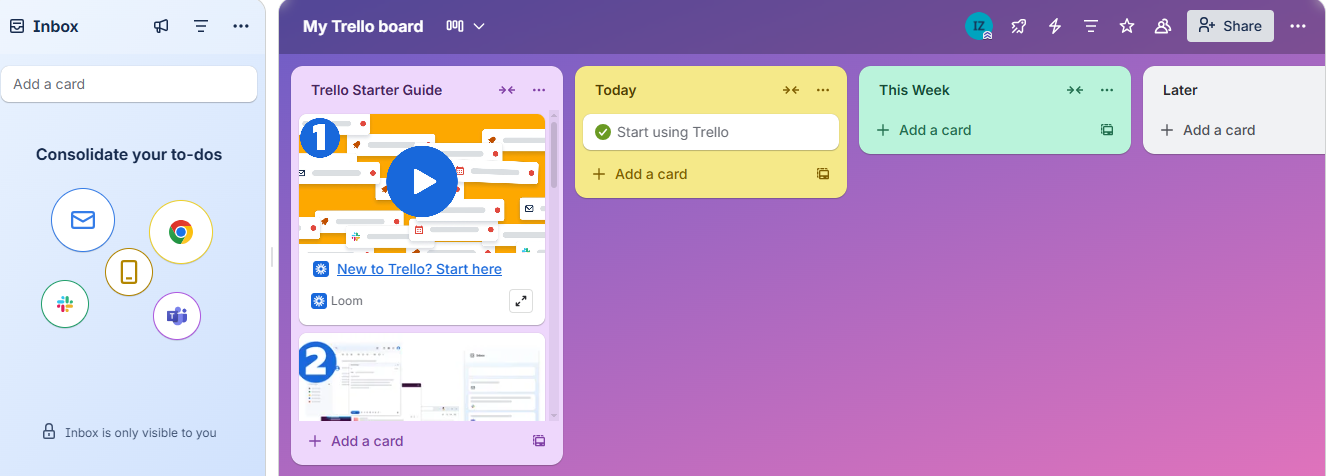
Trello turns messy workflows into clear, colorful boards where you can plan, track, and collaborate effortlessly. From personal to professional projects, its drag-and-drop simplicity, real-time sync, and smart automation make productivity feel easy, fun, and beautifully visual.
Imagine this — your desktop is flooded with sticky notes, half-finished checklists, and project updates scattered across a dozen chat threads. Deadlines sneak up like ninjas, and no one remembers who’s doing what. That’s when Trello walks in — calm, colorful, and ready to organize your chaos into something that actually makes sense.
But here’s the twist — Trello has been around for years. Once the cool kid of visual task management, it’s now competing with giants like ClickUp and Notion. So the question is: does this board-based wonder still deserve a spot on your screen in 2025?
Let’s find out. We tested Trello inside out — created boards, ran workflows, even added a few “pretend projects” — just to see if it still earns its place as the simplest, most satisfying productivity tool out there.
Basic Overview: What Exactly Is Trello?
At its heart, Trello is a visual project management tool that turns your to-dos into draggable cards on digital boards. Each board represents a project, each list a phase, and each card a task. You can add checklists, due dates, attachments, and team members — all with a single click and no learning curve.
What makes Trello different is how effortlessly visual it feels. You don’t need to “set up a system” or learn fancy terms — just drag, drop, and watch your workflow take shape.
It’s perfect for:
Freelancers managing clients or campaigns
Teams tracking project pipelines
Students organizing group tasks
Even individuals keeping their life in order (yes, there’s a board for your grocery list too!)
In short: Trello makes project management feel less like management — and more like play. And since we’re all about making work feel lighter at Fileion, we tested it so you don’t have to guess if it’s still the best.
What Trello Promises
Trello doesn’t try to be complicated — that’s its entire promise. Straight from its official page, Trello claims to “help teams move work forward” by keeping everything in one place — tasks, ideas, files, and updates — all visualized on flexible boards. Its core pitch? “Trello makes it easy for your team to get things done.”
The company says you can:
Organize anything using boards, lists, and cards.
Collaborate from anywhere, with real-time sync across devices.
Automate workflows using built-in tools like Butler.
Power up productivity by connecting with apps you already use — Slack, Google Drive, Jira, and more.
In short, Trello wants to be your go-to digital workspace — simple enough for individuals, yet powerful enough for full teams.
It’s a confident promise. But in 2025, with new tools flooding the market, does Trello still deliver the simplicity and flexibility it’s known for — or has it fallen behind? Let’s dive into our hands-on experience to find out.
Testing Trello (Our Hands-On Experience)
We jumped into Trello the same way most users would — no guides, no tutorials, just pure curiosity. The setup? Instant. Trello greets you with a clean, visual dashboard that practically begs you to start creating boards.
Our first impressions were solid:
Speed: It loaded in seconds — no lag or bloated visuals.
Setup: Within 3 minutes, we had a fully functional project board with tasks, due dates, and team members.
Collaboration: Updates sync instantly. You move a card → everyone sees it. No “refresh anxiety.”
Integrations: Adding Power-Ups like Google Calendar and Slack was simple, and they worked flawlessly.
Automation: Butler felt like a quiet assistant doing the small stuff — moving cards, setting reminders, and cleaning up repetitive actions.
Even with several active boards and multiple users, Trello didn’t slow down. Its mobile app mirrored the desktop experience perfectly, keeping productivity portable.
So far, Trello lives up to its promise of being clean, fast, and effortless. But usability isn’t just about what works — it’s also about how it feels. That’s where the next part comes in.
Ease of Use & Interface: Simplicity That Feels Smart
If you’ve ever tried managing projects on Excel or Jira, you know how quickly “organization” can turn into chaos. Trello flips that on its head.
Its drag-and-drop interface is ridiculously intuitive. You don’t need a manual or onboarding session. Boards feel alive — you can drag tasks between columns, drop attachments straight into cards, and rearrange your priorities on the fly.
The UI feels clean, colorful, and clutter-free. Each list and card is well-spaced, and visual cues (like labels, emojis, and progress checklists) make task management feel playful instead of pressured.
Another thing we loved — zero friction. Trello doesn’t bury features under layers of menus. Need to assign a task? One click. Add a file? Drag and drop. Automate a task? Just choose a rule and Butler handles it.
Compared to more complex project tools, Trello’s biggest win is that anyone can start using it within minutes — from a student tracking assignments to a full-blown marketing team running campaigns.
It’s simplicity done right — the kind that doesn’t make you feel limited.
And once you’re comfortable with the basics, that’s when the real magic starts: the features that make Trello stand out from the crowd.
Performance & Reliability
Trello doesn’t just look simple — it runs simple. During our testing, it loaded fast, synced instantly, and handled multitasking without breaking a sweat. Move a card on desktop? It appears on mobile in a blink. Add a teammate or upload an attachment? Everyone sees it, no refresh required.
Because Trello is fully cloud-based, its reliability depends on your internet connection — but when connected, it’s rock-solid. Boards sync across devices seamlessly, and we didn’t experience any crashes even when juggling multiple boards and Power-Ups.
On mobile, the performance was equally smooth. The app mirrors the desktop feel — quick to open, easy to scroll, and lightweight enough to run on mid-range devices. However, the only hiccup? Offline work. Trello offers partial offline access on mobile, but the desktop version is still dependent on a live connection.
Overall, Trello nails the “always ready” experience. It’s stable, fast, and rarely misbehaves — a refreshing change from project tools that lag behind your ideas.
Key Features That Stood Out
Butler Automation – Your Silent Work Assistant
If there’s one feature that makes Trello feel futuristic, it’s Butler. It quietly takes over repetitive tasks — like moving cards when due dates hit or sending reminders before deadlines. During our test, it felt like having a mini project manager that never sleeps. Just set a rule once, and Trello keeps things tidy for you.
Power-Ups – Make Trello Your Own
Trello shines when you add Power-Ups — small integrations that expand its brain. From Google Drive attachments to Slack notifications or Jira syncing, it connects everything in your workflow. We loved how easily these plug-ins snapped in without technical headaches. You can truly turn Trello into your workspace.
Multiple Views – Beyond the Basic Board
While Trello started as a Kanban tool, it’s evolved. The Table, Calendar, Timeline, and Dashboard views give you flexibility to see work from every angle. We switched between views mid-project, and it instantly refreshed how we tracked progress. For teams juggling deadlines, Timeline view alone is a game changer.
Ready-to-Use Templates
Not sure where to start? Trello’s template gallery has your back — from marketing plans to school projects and personal habit trackers. We used one to mock up a content calendar in seconds. It’s like skipping setup mode and jumping straight into productivity.
Real-Time Collaboration
When we say “instant,” we mean it. Add a comment, upload a file, or move a card — teammates see it live. No lag, no confusion, no “did you update it yet?” chaos. This responsiveness makes remote teamwork feel effortless, especially in hybrid setups.
Customizable Boards & Labels
Trello’s beauty lies in flexibility. You can color-code tasks, add emoji labels, or even attach GIFs (yes, productivity can be fun). Each board feels personal, and that visual clarity makes managing complex projects surprisingly easy.
Cross-Device Sync
Switching from desktop to mobile felt seamless. Updates appeared in real time, and notifications were perfectly synced. Whether you’re brainstorming on a laptop or checking a deadline on your phone, Trello keeps your workflow connected.
Integrations That Actually Work
We connected Trello to Slack, Google Calendar, and Dropbox — and they worked like a charm. No confusing setups, no syncing issues. It’s refreshing to see a tool that plays nicely with others instead of forcing you into its own ecosystem.
Task Attachments & Checklists
Cards aren’t just text boxes — you can upload files, add sub-tasks, and track progress with checklists. This makes it super handy for managing content, events, or client deliverables where small details matter.
Security You Can Trust
Trello is backed by Atlassian, so it uses enterprise-grade encryption and permission controls. While not flashy, that reliability gives teams peace of mind when sharing sensitive data or client files.
Lackings (What Trello Still Misses)
Limited Analytics and Reporting
Trello gives you a quick overview but not the deep insights. If you want charts, workload stats, or burn-down reports, you’ll need third-party add-ons. For data-driven teams, this feels like a missed opportunity.
No Native Offline Desktop Mode
This is a sore spot. The mobile app has some offline capability, but desktop users are left stranded without internet. For travelers or field workers, that’s a real limitation.
Too Simple for Complex Project Tracking
Trello’s charm is simplicity, but that’s also its biggest boundary. There’s no built-in dependency tracking or Gantt-style progress mapping. When projects scale up, users may outgrow it and move to heavier tools like ClickUp.
Automation Caps on Free Plans
Butler is amazing — until you hit its free plan limits. Once you reach your monthly quota, you’ll have to upgrade to keep automating. That can frustrate smaller teams relying on automation to stay organized.
Board Clutter Over Time
Trello can get messy fast if your team doesn’t maintain it. Without proper naming or cleanup, boards turn chaotic — like digital sticky-note overload. It’s not Trello’s fault, but it’s a real usability challenge.
Basic Time Tracking
While you can add time-tracking Power-Ups, there’s no built-in timer or activity log for hours spent. For freelancers or agencies, that’s one extra step that shouldn’t be necessary.
Limited Permissions in Lower Plans
In lower-tier plans, admin control feels too light. If you want granular control over who edits or deletes cards, you’ll need a paid plan. For small businesses, that upgrade might sting a bit.
What Could Be Improved (Future Wish-List)
Trello already nails simplicity, but a few smart upgrades could make it unstoppable. Here’s what users (and we) secretly wish for:
Built-in Timeline Dependencies: See how tasks connect—no add-ons required.
More Automation in Free Plans: Let smaller teams enjoy Butler without limits.
Native Analytics Dashboard: Quick insights into workload and progress.
Full Offline Mode: Work anywhere, sync later.
Integrated Time Tracking: Log hours right inside cards.
Better Admin Controls: Give small teams more power without extra cost.
Use Cases: Who Will Love Trello Most
Trello is one of those rare tools that fits almost everyone — whether you’re managing client projects or just trying to keep your week under control. Its visual design makes complex work feel digestible, even fun. If your brain loves structure that looks good, Trello is basically dopamine in board form.
Here’s where it truly shines:
Freelancers: Perfect for tracking client deadlines, sharing progress, and staying on top of revisions.
Students: Great for managing group projects or assignments without endless messaging chaos.
Teams: Marketing, design, or dev teams can easily plan campaigns and track pipelines in one place.
Individuals: From meal planning to home renovations, Trello turns personal chaos into visual calm.
No matter how you work, Trello scales with your creativity — not against it.
Pricing & Plans (2025 Update)
Trello’s pricing structure still keeps things friendly for every kind of user — from solo hustlers to full-scale enterprises. Here’s how it stacks up in 2025:
Free Plan: Ideal for individuals or small teams. Includes unlimited cards, up to 10 boards, and basic automation — enough to organize most projects with ease.
Standard Plan ($5 per user/month): Adds unlimited boards, advanced checklists, and custom fields — great for small businesses and active freelancers.
Premium Plan ($10 per user/month): Unlocks all views (Timeline, Table, Calendar, Dashboard) and advanced automation, making it perfect for growing teams.
Enterprise Plan (Custom Pricing): Designed for large organizations needing advanced security, permissions, and admin controls.
Even the free plan is generous enough for individuals and small teams — a refreshing rarity in today’s “pay-for-every-feature” world.
Security & Privacy
With Trello, your projects are in good hands. Owned by Atlassian, a trusted name in enterprise-grade software, Trello uses strong SSL encryption and two-factor authentication (2FA) to keep data safe. It’s also SOC2 compliant, ensuring your team’s information meets strict global security standards.
Trello’s privacy policy is refreshingly transparent, and workspace admins can control who sees, edits, or manages boards. In short, your projects stay private, protected, and professional — whether you’re solo or part of a massive team.
Trello vs Other Tools — Our Take
When we compared Trello with other project tools, the pattern was clear: it doesn’t try to out-feature anyone — it just makes getting things done feel easier.
Trello vs Asana: Asana is like the corporate planner who color-codes every detail — structured, report-heavy, great for teams that love precision. Trello? It’s the creative one with sticky notes all over the wall — fast, flexible, and visual.
Trello vs ClickUp: ClickUp wants to be your everything app — docs, tasks, chat, dashboards — but it can feel a bit like too much coffee. Trello keeps it calm. You open it, drag a card, move on with your day.
Trello vs Notion: Notion is for builders — people who love to design databases and customize every inch. Trello is for doers — people who just want to see their workflow at a glance and move things forward.
What the Community Says
We explored Reddit, G2, and a few project management forums to see what real users think about Trello — and the feedback remains consistent through the years. Most users still love how visually clear and beginner-friendly it is. On Reddit, one long-time user wrote, “Trello is one of the best task management platforms out there. I’ve been using it since 2018 — it’s stable, easy, and reliable.” (source) This simplicity is what keeps individuals and small teams coming back.
Over on G2, Trello scores an impressive 4.4 out of 5 from nearly 14,000 reviews. Users praise the drag-and-drop board style that makes managing projects feel “fun instead of stressful.” One reviewer mentioned, “The visual interface is incredibly intuitive; you can jump in without reading a manual.” That kind of accessibility is what sets Trello apart from heavier tools like Jira or ClickUp.
However, users also point out where Trello begins to struggle — mainly with larger teams or advanced workflows. Some Reddit threads mention that “Trello starts out great, but once your board gets big, it becomes messy and hard to track.” (source) On G2, others complain about the lack of deep analytics, offline access, or built-in time tracking. It’s a reminder that Trello shines for organizing chaos — but may not fully manage a growing business.
In short, the community consensus is clear: Trello remains loved, trusted, and refreshingly easy, even if it’s not the most advanced tool on the market. It’s the digital equivalent of sticky notes done right — lightweight, colorful, and dependable — perfect for anyone who values clarity over complexity.
Trello in 2025 — Why You Should (or Shouldn’t) Use It Now
So, is Trello still worth your time in 2025? Absolutely — if you value clarity over complexity. Atlassian continues to roll out improvements, from enhanced automation and new dashboard views to deeper integrations with tools like Slack, Google Drive, and Microsoft Teams.
Trello still wins big for small-to-mid teams, freelancers, and anyone who wants visual control without the overwhelm of enterprise-level platforms. However, if you need advanced reporting, detailed task dependencies, or deep analytics, competitors like ClickUp and Notion might offer more firepower.
But here’s the truth: Trello doesn’t need to be everything — it just needs to make your work feel doable again. And in 2025, it still proves that simplicity never goes out of style.
Bottom Line for Trello
Trello may not run your entire company, but it can absolutely organize your chaos — visually, neatly, and with just enough color to make work fun again. It’s not the tool for micromanagers or data lovers; it’s for doers who want clarity without complexity.
Whether you’re tracking a side hustle, leading a small team, or just trying to bring order to your brain, Trello still delivers that perfect blend of simple meets smart.
At Fileion, our verdict is clear — in a world full of heavy project tools, Trello keeps things light, human, and delightfully effective.
Hi, I’m Ishrat, Junior Content Writer at Fileion. With a strong passion for tech and a background i...
1
Followers
0
Following
Software Content Writer
Hi, I’m Ishrat, Junior Content Writer at Fileion. With a strong passion for tech and a background in SEO, digital content, and web solutions, I craft stories that connect users to the tools they need. At Fileion, I turn complex topics into clear, helpful content, making tech feel simple and accessible for everyone. Let’s write something impactful!
FAQs
Frequently Asked Questions
Key features include Butler automation, multiple board views, AI suggestions, labels, checklists, due dates, file attachments, and real-time comments. They help users stay on top of tasks effortlessly.
Users occasionally face sync delays, slow board loading, or Power-Up glitches. Refreshing, clearing cache, or using incognito mode usually fixes these issues quickly.
Trello is often cheaper for small teams, with a generous free plan and flexible paid options. Unlike some competitors, it focuses on simplicity and essential productivity features without overwhelming users.